Saturday, March 2, 2013
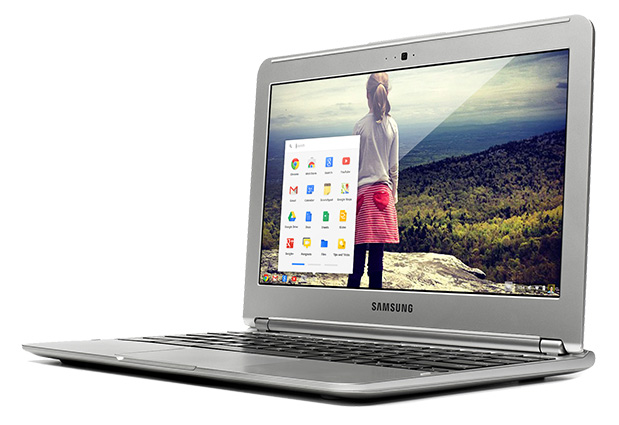
30 Days with a Chromebook
Project Proposal: After a week of thinking about chromebooks (after seeing my friend Bethanie's and using it briefly), I've been thinking of getting one. This makes some sense, as I'm always buying new computers and new operating systems and technically there is a whole in my netbook lineup (having sold my Dell Mini9 Hackintosh), but it makes less sense as I already own a perfectly good Macbook Pro.
However there is something to be said about Computer Specialization, which is definately something that I'm into these days. My kindle paperwhite is a dedicated reader. When I pick it up, my job is to read a book and it's job is to display it to me, which it does brilliantly and backlit these days (however it stopped reading books aloud to me, for reasons that are more political than techinal). The Chromebook would be a "work computer" that is to say my goal would be to use it for typing and to use it to increase my typing. Also I'd try to use the chromebook to type in new locations like coffee shops. People have always said that I should get out and write more and that it would allow me to focus (which is ironic, as I've had to stop typing this several times to deal with the dogs and there's endless distractions at home).
The idea I've had right now is to get a chromebook (and case) from Best Buy (therefore, I will be trying it for 30 days from Best Buy and if I don't like it or use it enough, it will be going back!) , walk the mall to the Starbucks, find some free internet and see how this thing really works. I've already been uploading music to Google Music, I have a pair of bluetooth headphones and of course I have my hands for typing. Can I be in Starbucks with a totally set up typing machine with a nice library of music on a light computer that has no fans and no hard drive? (basically a toy? more like a typewriter than a computer.)
I've even heard it can do remote desktop. That would allow me to control my computers that really do stuff and still do things while chromebooking (which I mean to be typing and typing and typing. The endless typing that I must do until I communicate more and properly.)
BestBuy has a 30 day return policy, so if the computer isn't up to snuff (possible reasons for rejection, it's not fast enough, doesn't turn on quick enough (i've heard there's some sleeping issues), is too light, is too small (keyboard rest could be an issue), how it feels on a lap, how it feels on a table, how it looks, how the OS is configured (can I hide the taskbar?)
Goals:
- Type 100,000 words on the Chromebook
- Apply for 100 jobs on the Chromebook
- update and improve my resume with the Chromebook
- Write 10 short stories
- Write 10 poems
- seriously work on my re-write
- Write 1 collaborative story on Google Docs (while hanging out?)
- Host a Live Hangout? (get friends to call in?) - upload it to youtube afterwards?
(the webcam has been desribed as one that monet would love, so I'll bet it sucks, but it's a neat option again an updgrade on pen and paper)
- Create some images on the chromebook (is this even possible?)
- Write 30 daily update posts for Nitpicking Google
(not be distracted by the slamming of doors at home, be distracted by the people of the world, all potential characters and people to learn from)
- Write in 5 public places
- Maybe take Chromebook on a hike somewhere.
- Take Chromebook on a bike ride
(I wanted to write, test Chromebook in outer space, but I realize that's not an option.... yet.)
I think this is going to be a real fun project, and if the Chromebook isn't up to snuff, or I find out that I don't need it after two weeks (many people predict that I only really need to try out the technology not actually own it and that I'll be through with the Chromebook after two weeks and back to my mac. They might be right.) then I'll just return it. To infinity and beyond! (that is to say I'm gonna go take a shower. no typing in there.)
Wednesday, February 27, 2013
Music Manager, just generally buggy and confusing
Then I made my folder, "Upload to Google Music" and told the program where it was. It said it found 71 songs. Then it went back to 0 new songs and said it was uploading 0 of 7 songs on the sidebar. Not really sure what it's doing now. I guess 7 could mean 71. It's very odd.
more "Music Manager" annoyance
The program's icon says "Google Play" and doesn't have the Music Manager icon or upload arrow. The title bar says "Music Manager".
The real problem is you can't drag and drop songs onto it. I don't want to upload a whole folder, I just want to add a song. Or maybe multiple songs. This is the kind of uploading I'd usually want to do through a webpage (like the youtube uploader), but Google Music only has the music manager. Annoying!
More Google Music Manager Confusion and Why can't there be an option for black icons?
why not an option for all black icons, Google?
so then my mac asks me if I want to run "Music Manager" and frankly it has a good point. What is "Music Manager"? Sounds suspicious and powerful. It's gonna manage my music. Manage it good. Then a pop up window asks me to sign into "Google Music Manager". What is that? Also how annoying. I'm already signed into Google Notifer? Why not use that one? I can see it, it's two icons down from the grey (annoying) headphones icon (again why not offer the option to set the icon to black. Look at my beautiful non-annoying dropbox icon that has the option!) (*also, spell checkers of the world, can you start autocorrecting teh to the automatically? No one ever means to type teh, though I guess blogger and google docs don't have auto complete for words yet? or maybe I just don't have it turned on. Not sure. Used it once on Open Office, it was creepy but seemed like it saved time. Wonder how it would work for storywriting. Think it needed a better and faster dictionary as well last time I used it.
Google App names, name everything with Google or don't. (having standards matters)
on my mac, "Google Chrome, Google Drive, Google Earth, Google Notifer, and Google Sketchup 8 (which annoyingly used a number and added a totally uneccessary folder which contains an application called "SketchUp")" are all grouped together because they start with "Google".
However "Music Manager" from Google Play is not named Google Music Manager and is not grouped with these other applications, making it hard to find.
Wednesday, February 6, 2013
Blogger: BUG! Editing Pages causes page to duplicate and wipe out first page
and boy is it annoying. Yeah. You read the headline correctly. In blogger, go to pages, edit page, update the page and it duplicates that page and replaces the first page. Everytime I edit a page on my website I have to recut and paste the first link. At first I thought I was causing the problem by using spaces in my Page titles, but I changed that and it's still happening. It's a real live blogger bug and boy is it annoying.
Wednesday, September 19, 2012
GDocs desperately needs the ability to re-open a document at the last edited point
I'm sick of paging through my document to get to the end. Why not re-open the document to the last edited point?
Tuesday, August 7, 2012
Monday, August 6, 2012
New Youtube Error screen has static and rolling vertical lines (cause you're awesome Google)
Only way I could see improving it in the future, would be if it tuned in random TV channels and showed you random staticy videos. Hilarious how people are making new technology mimic old technology.
Monday, July 9, 2012
Blogger works poorly with images, won't left justify my text and makes me want to smash my computer
Blogger kinda sucks with moving images around and won't left justify my text and makes me want to smash my computer. It won't stack images next to eachother properly. It doesn't deal well with large images or sizing them or moving them around the text. It's a huge ball of fail.
Wednesday, July 4, 2012
Can't believe you're doing this to me, Google
I'm now reconfiguring my MyYahoo account, which I haven't used since 2005? 2007? whenever iGoogle was introduced. It's like a lame outdated version of iGoogle, but at least Yahoo didn't close it for no reason. It's hard to configure, ugly, and hard to use, but at least it won't be disapearing for no reason with no alternative provided. Pathetic Google. Fucking Pathetic.
Google to close Blogger, Reader and Search
In more of their ongoing spring cleaning, Google has pledged to close every single part of Google that you currently use, if you do not start using Google+ instead of Facebook. "At Google, we're very serious about our products," said administrix Marissa Miller, "We find out what people are using, design interfaces that they like and then we shutdown the project because it's not related to Google+."
With the closing of Blogger, Reader and Search, Google is making a serious push into Google+. "We know that users love our current offerings, but once we close Blogger, Reader and Search, we feel that users will have nothing else to do but love Google+ as well," said Sergey Brin, CEO. "We've heard your pleas that you'll simply use another search engine or go back to using MyYahoo, but our core focus is not the end user. Our core focus is how many products do we have to close before people will submit and use Google+. We thought that last year's decision to close iGoogle, and throw away all that traffic for no reason, to decouple our google services, disconnect them and make them harder to use would give people the right idea. We at Google don't give a shit about our users, unless they're using Google+."
When asked about plans for the future, Google said they plan to shutdown the popular GoogleNews application. "As we've seen with the growth of apps and appstores, old webpages like Google News that people use everyday to get the news, simply aren't as valuable as they used to be." said Marissa Miller, "In fact, one of our engineers believes that Google could elminate it's entire web presence by 2015. We will exist entirely in the Google Chrome Play App Store." Just don't tell her, that Google plans to close the Chrome Play App Store in 2014, siting a lack of user interest in the Android platform, which they also plan to sunset in 2013. "Basically we don't want anyone to use our products and we will do whatever is neccessary to chase them away. Even if they switched from MyYahoo years ago and prefer iGoogles smooth interface to the jangled mess of MyYahoo, we don't care. We want to send them away, back to what they used for information in the 90s. Ideally old competitors like Alta Vista and Lycos will rise up again to take this web traffic that after all these years and all this work, we really don't want."
With the closing of Blogger, Reader and Search, Google is making a serious push into Google+. "We know that users love our current offerings, but once we close Blogger, Reader and Search, we feel that users will have nothing else to do but love Google+ as well," said Sergey Brin, CEO. "We've heard your pleas that you'll simply use another search engine or go back to using MyYahoo, but our core focus is not the end user. Our core focus is how many products do we have to close before people will submit and use Google+. We thought that last year's decision to close iGoogle, and throw away all that traffic for no reason, to decouple our google services, disconnect them and make them harder to use would give people the right idea. We at Google don't give a shit about our users, unless they're using Google+."
When asked about plans for the future, Google said they plan to shutdown the popular GoogleNews application. "As we've seen with the growth of apps and appstores, old webpages like Google News that people use everyday to get the news, simply aren't as valuable as they used to be." said Marissa Miller, "In fact, one of our engineers believes that Google could elminate it's entire web presence by 2015. We will exist entirely in the Google Chrome Play App Store." Just don't tell her, that Google plans to close the Chrome Play App Store in 2014, siting a lack of user interest in the Android platform, which they also plan to sunset in 2013. "Basically we don't want anyone to use our products and we will do whatever is neccessary to chase them away. Even if they switched from MyYahoo years ago and prefer iGoogles smooth interface to the jangled mess of MyYahoo, we don't care. We want to send them away, back to what they used for information in the 90s. Ideally old competitors like Alta Vista and Lycos will rise up again to take this web traffic that after all these years and all this work, we really don't want."
Google to eliminate iGoogle - WHY?
WHY?
I visit your homepage every day. Now you want me to stop?
Yes, there are alternatives in the Google Chrome store that allow you to view the weather, but what about viewing the weather while I view my to-do list, while I view a few google news boxes. There isn't an app for that, because it's called iGoogle.
Even the name of their article is embarassing:
"What's happening to iGoogle?"
It's clear that they know they're pissing people off. What's happening to this service I loved? Why are you killing it?
this is just ridiculous:
I visit your homepage every day. Now you want me to stop?
Yes, there are alternatives in the Google Chrome store that allow you to view the weather, but what about viewing the weather while I view my to-do list, while I view a few google news boxes. There isn't an app for that, because it's called iGoogle.
Even the name of their article is embarassing:
"What's happening to iGoogle?"
It's clear that they know they're pissing people off. What's happening to this service I loved? Why are you killing it?
this is just ridiculous:
What's happening to iGoogle?
iGoogle will be retired in 16 months, on November 1, 2013. The mobile version will be retired on July 31, 2012.
How did you come to this decision?
We originally launched iGoogle in 2005 before anyone could fully imagine the ways that today's web and mobile apps would put personalized, real-time information at your fingertips. With modern apps that run on platforms like Chrome and Android, the need for something like iGoogle has eroded over time, so we’ll be winding down iGoogle on November 1, 2013, giving you a full 16 months to adjust or easily export your iGoogle data.
What will happen to the data stored in my gadgets?
All of your personal data stored in other Google products will continue to be available via those products, including Gmail, Google Calendar, Google Finance, Google Docs (now Google Drive),Google Bookmarks, and Google Tasks. Other gadgets, like the to-do list, allow you to export your data - look for the “Download all” option under the drop-down menu tied to the title of your list. Most iGoogle gadgets are created and maintained by third-party developers. If you’d like to export your data, you should contact the gadget creator directly.
I really like iGoogle -- are there any other alternatives?
On your mobile device, Google Play offers applications ranging from games to news readers tohome screen widgets.
If you’re a fan of Google Chrome, the Chrome Web Store provides a similar range of options likeproductivity tools and applications to check the weather. In addition, just like iGoogle, you canpersonalize Chrome with a theme.
How did you come to this decision?
We originally launched iGoogle in 2005 before anyone could fully imagine the ways that today's web and mobile apps would put personalized, real-time information at your fingertips. With modern apps that run on platforms like Chrome and Android, the need for something like iGoogle has eroded over time, so we’ll be winding down iGoogle on November 1, 2013, giving you a full 16 months to adjust or easily export your iGoogle data.
What will happen to the data stored in my gadgets?
All of your personal data stored in other Google products will continue to be available via those products, including Gmail, Google Calendar, Google Finance, Google Docs (now Google Drive),Google Bookmarks, and Google Tasks. Other gadgets, like the to-do list, allow you to export your data - look for the “Download all” option under the drop-down menu tied to the title of your list. Most iGoogle gadgets are created and maintained by third-party developers. If you’d like to export your data, you should contact the gadget creator directly.
I really like iGoogle -- are there any other alternatives?
On your mobile device, Google Play offers applications ranging from games to news readers tohome screen widgets.
If you’re a fan of Google Chrome, the Chrome Web Store provides a similar range of options likeproductivity tools and applications to check the weather. In addition, just like iGoogle, you canpersonalize Chrome with a theme.
Subscribe to:
Posts (Atom)


